

How to self-host Supabse using Docker
Supabase is a free and open-source Backend-as-a-Service (BaaS) that can be self-hosted. This guide will walk you through the steps to deploy Supabase using Docker.
What you need
You need an up-to-date version of Docker and Docker Compose, installed on your web-server (e.g., running on Ubuntu 20.04) and a domain, pointed to your server’s IP address.
Docker installed on your server
A domain name pointed to your server’s IP address
Deploy Supabase using docker-compose
Step 1: Update your server and install docker-compose
Simply copy and paste the code below into your cmd/terminal and follow the instructions.
1apt update && apt -y upgrade
2apt install docker-compose-plugin
Note: We have Docker pre-installed on our server, by using the Docker CE app image inside Hetzner Cloud. Hence, we only need to install the docker-compose-plugin package.
Step 2: Clone the Supabase Git repository to your server
Next, simply clone the Supabase Git repository by running this command:
1git clone --depth 1 https://github.com/supabase/supabaseNote: When you use –depth 1, you’re telling Git to only fetch the latest commit. You usually want this.
Step 3: Change the directory to supabase/docker
Now, navigate to supabase/docker by using the cd command.
1cd supabase/dockerStep 4: Backup your docker-compose.yml file
Simply run the following command.
1cp docker-compose.yml docker-compose.yml.bkpNote: This copy is just a backup, in case you might want to take a look at it later on. Just to be safe, of course.
Step 5: Create your .env file by copying .env.example
Now, you want to create a new .env file by copying the existing .env.example file and naming it .env.
1cp .env.example .envStep 6: Stop kong from using ports inside the docker-compose.yml file
Now, you need to commit a few changes to your docker-compose.yml file. These changes include stopping kong from using ports inside said file, otherwise they would be public. You don’t want that.
First, open your docker-compose.yml file.
1nano docker-compose.ymlNext, search for the service named “kong” and put a # in front of the three port lines.
1kong:
2    container_name: supabase-kong
3    image: kong:2.8.1
4    restart: unless-stopped
5    # https://unix.stackexchange.com/a/294837
6    entrypoint: bash -c 'eval "echo \"$$(cat ~/temp.yml)\"" > ~/kong'
7#    ports:
8#      - ${KONG_HTTP_PORT}:8000/tcp
9#      - ${KONG_HTTPS_PORT}:8443/tcp
10    depends_on:
11      analytics:
12        condition: service_healthy
13    environment:
14      KONG_DATABASE: "off"
15      KONG_DECLARATIVE_CONFIG: /home/kong/kong.yml
16      # https://github.com/supabase/cli/issues/14
17      KONG_DNS_ORDER: LAST,A,CNAME
18      KONG_PLUGINS: request-transformer,cors,key-auth,acl,basic-auth
19      KONG_NGINX_PROXY_PROXY_BUFFER_SIZE: 160k
20      KONG_NGINX_PROXY_PROXY_BUFFERS: 64 160k
21      SUPABASE_ANON_KEY: ${ANON_KEY}
22      SUPABASE_SERVICE_KEY: ${SERVICE_ROLE_KEY}
23      DASHBOARD_USERNAME: ${DASHBOARD_USERNAME}
24      DASHBOARD_PASSWORD: ${DASHBOARD_PASSWORD}
25    volumes:
26      # https://github.com/supabase/supabase/issues/12661
27      - ./volumes/api/kong.yml:/home/kong/temp.yml:ro
Note: You can save your changes by pressing ctrl + S or ctrl + O and confirm by hitting Enter. To exit the nano editor, simply pressing ctrl + B and hitting Enter to confirm.
Step 7: Remove the dashbord from the kong.yml file
First, navigate to your kong.yml file.
1nano volumes/api/kong.ymlNext, remove the entire - dashboard part inside the file.
Step 8: Add nginx to your docker-compose.yml file
Simply open your docker-compose.yml file.
1nano docker-compose.ymlOnce inside, you’ll see a section called services: inside, there are different services needed by Supabase to work properly. You want to scroll to the bottom of the file. Right before the services: sections ends, add nginx as a new service.
1nginx:
2    image: 'jc21/nginx-proxy-manager:latest'
3    restart: unless-stopped
4    ports:
5      # These ports are in format <host-port>:<container-port>
6      - '80:80'    # Public HTTP Port
7      - '443:443'  # Public HTTPS Port
8      - '81:81'    # Admin Web Port
9    volumes:
10      - ./nginx-data:/data
11      - ./nginx-letsencrypt:/etc/letsencrypt
12      - ./nginx-snippets:/snippets:ro
13    environment:
14      TZ: 'Europe/Berlin'
Your final docker-compose.yml file should look similar to this:
1# Usage
2#   Start:              docker compose up
3#   With helpers:       docker compose -f docker-compose.yml -f ./dev/docker-compose.dev.yml up
4#   Stop:               docker compose down
5#   Destroy:            docker compose -f docker-compose.yml -f ./dev/docker-compose.dev.yml down -v --remove-orphans
6#   Reset everything:  ./reset.sh
7name: supabase
8services:
9  studio:
10    container_name: supabase-studio
11    image: supabase/studio:20250113-83c9420
12    restart: unless-stopped
13    healthcheck:
14      test:
15        [
16          "CMD",
17          "node",
18          "-e",
19          "fetch('http://studio:3000/api/profile').then((r) => {if (r.status !== 200) throw new Error(r.status)})"
20        ]
21      timeout: 10s
22      interval: 5s
23      retries: 3
24    depends_on:
25      analytics:
26        condition: service_healthy
27    environment:
28      STUDIO_PG_META_URL: http://meta:8080
29      POSTGRES_PASSWORD: ${POSTGRES_PASSWORD}
30      DEFAULT_ORGANIZATION_NAME: ${STUDIO_DEFAULT_ORGANIZATION}
31      DEFAULT_PROJECT_NAME: ${STUDIO_DEFAULT_PROJECT}
32      OPENAI_API_KEY: ${OPENAI_API_KEY:-}
33      SUPABASE_URL: http://kong:8000
34      SUPABASE_PUBLIC_URL: ${SUPABASE_PUBLIC_URL}
35      SUPABASE_ANON_KEY: ${ANON_KEY}
36      SUPABASE_SERVICE_KEY: ${SERVICE_ROLE_KEY}
37      AUTH_JWT_SECRET: ${JWT_SECRET}
38      LOGFLARE_API_KEY: ${LOGFLARE_API_KEY}
39      LOGFLARE_URL: http://analytics:4000
40      NEXT_PUBLIC_ENABLE_LOGS: true
41      # Comment to use Big Query backend for analytics
42      NEXT_ANALYTICS_BACKEND_PROVIDER: postgres
43      # Uncomment to use Big Query backend for analytics
44      # NEXT_ANALYTICS_BACKEND_PROVIDER: bigquery
45  kong:
46    container_name: supabase-kong
47    image: kong:2.8.1
48    restart: unless-stopped
49    # ports:
50    #  - ${KONG_HTTP_PORT}:8000/tcp
51    #  - ${KONG_HTTPS_PORT}:8443/tcp
52    volumes:
53      # https://github.com/supabase/supabase/issues/12661
54      - ./volumes/api/kong.yml:/home/kong/temp.yml:ro
55    depends_on:
56      analytics:
57        condition: service_healthy
58    environment:
59      KONG_DATABASE: "off"
60      KONG_DECLARATIVE_CONFIG: /home/kong/kong.yml
61      # https://github.com/supabase/cli/issues/14
62      KONG_DNS_ORDER: LAST,A,CNAME
63      KONG_PLUGINS: request-transformer,cors,key-auth,acl,basic-auth
64      KONG_NGINX_PROXY_PROXY_BUFFER_SIZE: 160k
65      KONG_NGINX_PROXY_PROXY_BUFFERS: 64 160k
66      SUPABASE_ANON_KEY: ${ANON_KEY}
67      SUPABASE_SERVICE_KEY: ${SERVICE_ROLE_KEY}
68      DASHBOARD_USERNAME: ${DASHBOARD_USERNAME}
69      DASHBOARD_PASSWORD: ${DASHBOARD_PASSWORD}
70    # https://unix.stackexchange.com/a/294837
71    entrypoint: bash -c 'eval "echo \"$$(cat ~/temp.yml)\"" > ~/kong.yml && /docker-entrypoint.sh kong docker-start'
72  auth:
73    container_name: supabase-auth
74    image: supabase/gotrue:v2.167.0
75    restart: unless-stopped
76    healthcheck:
77      test:
78        [
79          "CMD",
80          "wget",
81          "--no-verbose",
82          "--tries=1",
83          "--spider",
84          "http://localhost:9999/health"
85        ]
86      timeout: 5s
87      interval: 5s
88      retries: 3
89    depends_on:
90      db:
91        # Disable this if you are using an external Postgres database
92        condition: service_healthy
93      analytics:
94        condition: service_healthy
95    environment:
96      GOTRUE_API_HOST: 0.0.0.0
97      GOTRUE_API_PORT: 9999
98      API_EXTERNAL_URL: ${API_EXTERNAL_URL}
99      GOTRUE_DB_DRIVER: postgres
100      GOTRUE_DB_DATABASE_URL: postgres://supabase_auth_admin:${POSTGRES_PASSWORD}@${POSTGRES_HOST}:${POSTGRES_PORT}/${POSTGRES_DB}
101      GOTRUE_SITE_URL: ${SITE_URL}
102      GOTRUE_URI_ALLOW_LIST: ${ADDITIONAL_REDIRECT_URLS}
103      GOTRUE_DISABLE_SIGNUP: ${DISABLE_SIGNUP}
104      GOTRUE_JWT_ADMIN_ROLES: service_role
105      GOTRUE_JWT_AUD: authenticated
106      GOTRUE_JWT_DEFAULT_GROUP_NAME: authenticated
107      GOTRUE_JWT_EXP: ${JWT_EXPIRY}
108      GOTRUE_JWT_SECRET: ${JWT_SECRET}
109      GOTRUE_EXTERNAL_EMAIL_ENABLED: ${ENABLE_EMAIL_SIGNUP}
110      GOTRUE_EXTERNAL_ANONYMOUS_USERS_ENABLED: ${ENABLE_ANONYMOUS_USERS}
111      GOTRUE_MAILER_AUTOCONFIRM: ${ENABLE_EMAIL_AUTOCONFIRM}
112      # Uncomment to bypass nonce check in ID Token flow. Commonly set to true when using Google Sign In on mobile.
113      # GOTRUE_EXTERNAL_SKIP_NONCE_CHECK: true
114      # GOTRUE_MAILER_SECURE_EMAIL_CHANGE_ENABLED: true
115      # GOTRUE_SMTP_MAX_FREQUENCY: 1s
116      GOTRUE_SMTP_ADMIN_EMAIL: ${SMTP_ADMIN_EMAIL}
117      GOTRUE_SMTP_HOST: ${SMTP_HOST}
118      GOTRUE_SMTP_PORT: ${SMTP_PORT}
119      GOTRUE_SMTP_USER: ${SMTP_USER}
120      GOTRUE_SMTP_PASS: ${SMTP_PASS}
121      GOTRUE_SMTP_SENDER_NAME: ${SMTP_SENDER_NAME}
122      GOTRUE_MAILER_URLPATHS_INVITE: ${MAILER_URLPATHS_INVITE}
123      GOTRUE_MAILER_URLPATHS_CONFIRMATION: ${MAILER_URLPATHS_CONFIRMATION}
124      GOTRUE_MAILER_URLPATHS_RECOVERY: ${MAILER_URLPATHS_RECOVERY}
125      GOTRUE_MAILER_URLPATHS_EMAIL_CHANGE: ${MAILER_URLPATHS_EMAIL_CHANGE}
126      GOTRUE_EXTERNAL_PHONE_ENABLED: ${ENABLE_PHONE_SIGNUP}
127      GOTRUE_SMS_AUTOCONFIRM: ${ENABLE_PHONE_AUTOCONFIRM}
128      # Uncomment to enable custom access token hook. Please see: https://supabase.com/docs/guides/auth/auth-hooks for full list of hooks and additional details about custom_access_token_hook
129      # GOTRUE_HOOK_CUSTOM_ACCESS_TOKEN_ENABLED: "true"
130      # GOTRUE_HOOK_CUSTOM_ACCESS_TOKEN_URI: "pg-functions://postgres/public/custom_access_token_hook"
131      # GOTRUE_HOOK_CUSTOM_ACCESS_TOKEN_SECRETS: "<standard-base64-secret>"
132      # GOTRUE_HOOK_MFA_VERIFICATION_ATTEMPT_ENABLED: "true"
133      # GOTRUE_HOOK_MFA_VERIFICATION_ATTEMPT_URI: "pg-functions://postgres/public/mfa_verification_attempt"
134      # GOTRUE_HOOK_PASSWORD_VERIFICATION_ATTEMPT_ENABLED: "true"
135      # GOTRUE_HOOK_PASSWORD_VERIFICATION_ATTEMPT_URI: "pg-functions://postgres/public/password_verification_attempt"
136      # GOTRUE_HOOK_SEND_SMS_ENABLED: "false"
137      # GOTRUE_HOOK_SEND_SMS_URI: "pg-functions://postgres/public/custom_access_token_hook"
138      # GOTRUE_HOOK_SEND_SMS_SECRETS: "v1,whsec_VGhpcyBpcyBhbiBleGFtcGxlIG9mIGEgc2hvcnRlciBCYXNlNjQgc3RyaW5n"
139      # GOTRUE_HOOK_SEND_EMAIL_ENABLED: "false"
140      # GOTRUE_HOOK_SEND_EMAIL_URI: "http://host.docker.internal:54321/functions/v1/email_sender"
141      # GOTRUE_HOOK_SEND_EMAIL_SECRETS: "v1,whsec_VGhpcyBpcyBhbiBleGFtcGxlIG9mIGEgc2hvcnRlciBCYXNlNjQgc3RyaW5n"
142  rest:
143    container_name: supabase-rest
144    image: postgrest/postgrest:v12.2.0
145    restart: unless-stopped
146    depends_on:
147      db:
148        # Disable this if you are using an external Postgres database
149        condition: service_healthy
150      analytics:
151        condition: service_healthy
152    environment:
153      PGRST_DB_URI: postgres://authenticator:${POSTGRES_PASSWORD}@${POSTGRES_HOST}:${POSTGRES_PORT}/${POSTGRES_DB}
154      PGRST_DB_SCHEMAS: ${PGRST_DB_SCHEMAS}
155      PGRST_DB_ANON_ROLE: anon
156      PGRST_JWT_SECRET: ${JWT_SECRET}
157      PGRST_DB_USE_LEGACY_GUCS: "false"
158      PGRST_APP_SETTINGS_JWT_SECRET: ${JWT_SECRET}
159      PGRST_APP_SETTINGS_JWT_EXP: ${JWT_EXPIRY}
160    command:
161      [
162        "postgrest"
163      ]
164  realtime:
165    # This container name looks inconsistent but is correct because realtime constructs tenant id by parsing the subdomain
166    container_name: realtime-dev.supabase-realtime
167    image: supabase/realtime:v2.34.7
168    restart: unless-stopped
169    depends_on:
170      db:
171        # Disable this if you are using an external Postgres database
172        condition: service_healthy
173      analytics:
174        condition: service_healthy
175    healthcheck:
176      test:
177        [
178          "CMD",
179          "curl",
180          "-sSfL",
181          "--head",
182          "-o",
183          "/dev/null",
184          "-H",
185          "Authorization: Bearer ${ANON_KEY}",
186          "http://localhost:4000/api/tenants/realtime-dev/health"
187        ]
188      timeout: 5s
189      interval: 5s
190      retries: 3
191    environment:
192      PORT: 4000
193      DB_HOST: ${POSTGRES_HOST}
194      DB_PORT: ${POSTGRES_PORT}
195      DB_USER: supabase_admin
196      DB_PASSWORD: ${POSTGRES_PASSWORD}
197      DB_NAME: ${POSTGRES_DB}
198      DB_AFTER_CONNECT_QUERY: 'SET search_path TO _realtime'
199      DB_ENC_KEY: supabaserealtime
200      API_JWT_SECRET: ${JWT_SECRET}
201      SECRET_KEY_BASE: ${SECRET_KEY_BASE}
202      ERL_AFLAGS: -proto_dist inet_tcp
203      DNS_NODES: "''"
204      RLIMIT_NOFILE: "10000"
205      APP_NAME: realtime
206      SEED_SELF_HOST: true
207      RUN_JANITOR: true
208  # To use S3 backed storage: docker compose -f docker-compose.yml -f docker-compose.s3.yml up
209  storage:
210    container_name: supabase-storage
211    image: supabase/storage-api:v1.14.5
212    restart: unless-stopped
213    volumes:
214      - ./volumes/storage:/var/lib/storage:z
215    healthcheck:
216      test:
217        [
218          "CMD",
219          "wget",
220          "--no-verbose",
221          "--tries=1",
222          "--spider",
223          "http://storage:5000/status"
224        ]
225      timeout: 5s
226      interval: 5s
227      retries: 3
228    depends_on:
229      db:
230        # Disable this if you are using an external Postgres database
231        condition: service_healthy
232      rest:
233        condition: service_started
234      imgproxy:
235        condition: service_started
236    environment:
237      ANON_KEY: ${ANON_KEY}
238      SERVICE_KEY: ${SERVICE_ROLE_KEY}
239      POSTGREST_URL: http://rest:3000
240      PGRST_JWT_SECRET: ${JWT_SECRET}
241      DATABASE_URL: postgres://supabase_storage_admin:${POSTGRES_PASSWORD}@${POSTGRES_HOST}:${POSTGRES_PORT}/${POSTGRES_DB}
242      FILE_SIZE_LIMIT: 52428800
243      STORAGE_BACKEND: file
244      FILE_STORAGE_BACKEND_PATH: /var/lib/storage
245      TENANT_ID: stub
246      # TODO: https://github.com/supabase/storage-api/issues/55
247      REGION: stub
248      GLOBAL_S3_BUCKET: stub
249      ENABLE_IMAGE_TRANSFORMATION: "true"
250      IMGPROXY_URL: http://imgproxy:5001
251  imgproxy:
252    container_name: supabase-imgproxy
253    image: darthsim/imgproxy:v3.8.0
254    restart: unless-stopped
255    volumes:
256      - ./volumes/storage:/var/lib/storage:z
257    healthcheck:
258      test:
259        [
260          "CMD",
261          "imgproxy",
262          "health"
263        ]
264      timeout: 5s
265      interval: 5s
266      retries: 3
267    environment:
268      IMGPROXY_BIND: ":5001"
269      IMGPROXY_LOCAL_FILESYSTEM_ROOT: /
270      IMGPROXY_USE_ETAG: "true"
271      IMGPROXY_ENABLE_WEBP_DETECTION: ${IMGPROXY_ENABLE_WEBP_DETECTION}
272  meta:
273    container_name: supabase-meta
274    image: supabase/postgres-meta:v0.84.2
275    restart: unless-stopped
276    depends_on:
277      db:
278        # Disable this if you are using an external Postgres database
279        condition: service_healthy
280      analytics:
281        condition: service_healthy
282    environment:
283      PG_META_PORT: 8080
284      PG_META_DB_HOST: ${POSTGRES_HOST}
285      PG_META_DB_PORT: ${POSTGRES_PORT}
286      PG_META_DB_NAME: ${POSTGRES_DB}
287      PG_META_DB_USER: supabase_admin
288      PG_META_DB_PASSWORD: ${POSTGRES_PASSWORD}
289  functions:
290    container_name: supabase-edge-functions
291    image: supabase/edge-runtime:v1.66.5
292    restart: unless-stopped
293    volumes:
294      - ./volumes/functions:/home/deno/functions:Z
295    depends_on:
296      analytics:
297        condition: service_healthy
298    environment:
299      JWT_SECRET: ${JWT_SECRET}
300      SUPABASE_URL: http://kong:8000
301      SUPABASE_ANON_KEY: ${ANON_KEY}
302      SUPABASE_SERVICE_ROLE_KEY: ${SERVICE_ROLE_KEY}
303      SUPABASE_DB_URL: postgresql://postgres:${POSTGRES_PASSWORD}@${POSTGRES_HOST}:${POSTGRES_PORT}/${POSTGRES_DB}
304      # TODO: Allow configuring VERIFY_JWT per function. This PR might help: https://github.com/supabase/cli/pull/786
305      VERIFY_JWT: "${FUNCTIONS_VERIFY_JWT}"
306    command:
307      [
308        "start",
309        "--main-service",
310        "/home/deno/functions/main"
311      ]
312  analytics:
313    container_name: supabase-analytics
314    image: supabase/logflare:1.4.0
315    restart: unless-stopped
316    ports:
317      - 4000:4000
318    # Uncomment to use Big Query backend for analytics
319    # volumes:
320    #   - type: bind
321    #     source: ${PWD}/gcloud.json
322    #     target: /opt/app/rel/logflare/bin/gcloud.json
323    #     read_only: true
324    healthcheck:
325      test:
326        [
327          "CMD",
328          "curl",
329          "http://localhost:4000/health"
330        ]
331      timeout: 5s
332      interval: 5s
333      retries: 10
334    depends_on:
335      db:
336        # Disable this if you are using an external Postgres database
337        condition: service_healthy
338    environment:
339      LOGFLARE_NODE_HOST: 127.0.0.1
340      DB_USERNAME: supabase_admin
341      DB_DATABASE: _supabase
342      DB_HOSTNAME: ${POSTGRES_HOST}
343      DB_PORT: ${POSTGRES_PORT}
344      DB_PASSWORD: ${POSTGRES_PASSWORD}
345      DB_SCHEMA: _analytics
346      LOGFLARE_API_KEY: ${LOGFLARE_API_KEY}
347      LOGFLARE_SINGLE_TENANT: true
348      LOGFLARE_SUPABASE_MODE: true
349      LOGFLARE_MIN_CLUSTER_SIZE: 1
350      # Comment variables to use Big Query backend for analytics
351      POSTGRES_BACKEND_URL: postgresql://supabase_admin:${POSTGRES_PASSWORD}@${POSTGRES_HOST}:${POSTGRES_PORT}/_supabase
352      POSTGRES_BACKEND_SCHEMA: _analytics
353      LOGFLARE_FEATURE_FLAG_OVERRIDE: multibackend=true
354      # Uncomment to use Big Query backend for analytics
355      # GOOGLE_PROJECT_ID: ${GOOGLE_PROJECT_ID}
356      # GOOGLE_PROJECT_NUMBER: ${GOOGLE_PROJECT_NUMBER}
357  # Comment out everything below this point if you are using an external Postgres database
358  db:
359    container_name: supabase-db
360    image: supabase/postgres:15.8.1.020
361    restart: unless-stopped
362    volumes:
363      - ./volumes/db/realtime.sql:/docker-entrypoint-initdb.d/migrations/99-realtime.sql:Z
364      # Must be superuser to create event trigger
365      - ./volumes/db/webhooks.sql:/docker-entrypoint-initdb.d/init-scripts/98-webhooks.sql:Z
366      # Must be superuser to alter reserved role
367      - ./volumes/db/roles.sql:/docker-entrypoint-initdb.d/init-scripts/99-roles.sql:Z
368      # Initialize the database settings with JWT_SECRET and JWT_EXP
369      - ./volumes/db/jwt.sql:/docker-entrypoint-initdb.d/init-scripts/99-jwt.sql:Z
370      # PGDATA directory is persisted between restarts
371      - ./volumes/db/data:/var/lib/postgresql/data:Z
372      # Changes required for internal supabase data such as _analytics
373      - ./volumes/db/_supabase.sql:/docker-entrypoint-initdb.d/migrations/97-_supabase.sql:Z
374      # Changes required for Analytics support
375      - ./volumes/db/logs.sql:/docker-entrypoint-initdb.d/migrations/99-logs.sql:Z
376      # Changes required for Pooler support
377      - ./volumes/db/pooler.sql:/docker-entrypoint-initdb.d/migrations/99-pooler.sql:Z
378      # Use named volume to persist pgsodium decryption key between restarts
379      - db-config:/etc/postgresql-custom
380    healthcheck:
381      test:
382        [
383        "CMD",
384        "pg_isready",
385        "-U",
386        "postgres",
387        "-h",
388        "localhost"
389        ]
390      interval: 5s
391      timeout: 5s
392      retries: 10
393    depends_on:
394      vector:
395        condition: service_healthy
396    environment:
397      POSTGRES_HOST: /var/run/postgresql
398      PGPORT: ${POSTGRES_PORT}
399      POSTGRES_PORT: ${POSTGRES_PORT}
400      PGPASSWORD: ${POSTGRES_PASSWORD}
401      POSTGRES_PASSWORD: ${POSTGRES_PASSWORD}
402      PGDATABASE: ${POSTGRES_DB}
403      POSTGRES_DB: ${POSTGRES_DB}
404      JWT_SECRET: ${JWT_SECRET}
405      JWT_EXP: ${JWT_EXPIRY}
406    command:
407      [
408        "postgres",
409        "-c",
410        "config_file=/etc/postgresql/postgresql.conf",
411        "-c",
412        "log_min_messages=fatal" # prevents Realtime polling queries from appearing in logs
413      ]
414  vector:
415    container_name: supabase-vector
416    image: timberio/vector:0.28.1-alpine
417    restart: unless-stopped
418    volumes:
419      - ./volumes/logs/vector.yml:/etc/vector/vector.yml:ro
420      - ${DOCKER_SOCKET_LOCATION}:/var/run/docker.sock:ro
421    healthcheck:
422      test:
423        [
424          "CMD",
425          "wget",
426          "--no-verbose",
427          "--tries=1",
428          "--spider",
429          "http://vector:9001/health"
430        ]
431      timeout: 5s
432      interval: 5s
433      retries: 3
434    environment:
435      LOGFLARE_API_KEY: ${LOGFLARE_API_KEY}
436    command:
437      [
438        "--config",
439        "/etc/vector/vector.yml"
440      ]
441  # Update the DATABASE_URL if you are using an external Postgres database
442  supavisor:
443    container_name: supabase-pooler
444    image: supabase/supavisor:1.1.56
445    restart: unless-stopped
446    ports:
447      - ${POSTGRES_PORT}:5432
448      - ${POOLER_PROXY_PORT_TRANSACTION}:6543
449    volumes:
450      - ./volumes/pooler/pooler.exs:/etc/pooler/pooler.exs:ro
451    healthcheck:
452      test:
453        [
454          "CMD",
455          "curl",
456          "-sSfL",
457          "--head",
458          "-o",
459          "/dev/null",
460          "http://127.0.0.1:4000/api/health"
461        ]
462      interval: 10s
463      timeout: 5s
464      retries: 5
465    depends_on:
466      db:
467        condition: service_healthy
468      analytics:
469        condition: service_healthy
470    environment:
471      PORT: 4000
472      POSTGRES_PORT: ${POSTGRES_PORT}
473      POSTGRES_DB: ${POSTGRES_DB}
474      POSTGRES_PASSWORD: ${POSTGRES_PASSWORD}
475      DATABASE_URL: ecto://supabase_admin:${POSTGRES_PASSWORD}@db:${POSTGRES_PORT}/_supabase
476      CLUSTER_POSTGRES: true
477      SECRET_KEY_BASE: ${SECRET_KEY_BASE}
478      VAULT_ENC_KEY: ${VAULT_ENC_KEY}
479      API_JWT_SECRET: ${JWT_SECRET}
480      METRICS_JWT_SECRET: ${JWT_SECRET}
481      REGION: local
482      ERL_AFLAGS: -proto_dist inet_tcp
483      POOLER_TENANT_ID: ${POOLER_TENANT_ID}
484      POOLER_DEFAULT_POOL_SIZE: ${POOLER_DEFAULT_POOL_SIZE}
485      POOLER_MAX_CLIENT_CONN: ${POOLER_MAX_CLIENT_CONN}
486      POOLER_POOL_MODE: transaction
487    command:
488      [
489        "/bin/sh",
490        "-c",
491        "/app/bin/migrate && /app/bin/supavisor eval \"$$(cat /etc/pooler/pooler.exs)\" && /app/bin/server"
492      ]
493
494	nginx:
495    	image: 'jc21/nginx-proxy-manager:latest'
496    	restart: unless-stopped
497    	ports:
498     	 # These ports are in format <host-port>:<container-port>
499  	    - '80:80'    # Public HTTP Port
500   	    - '443:443'  # Public HTTPS Port
501   	    - '81:81'    # Admin Web Port
502   	  volumes:
503  	    - ./nginx-data:/data
504  	    - ./nginx-letsencrypt:/etc/letsencrypt
505   	    - ./nginx-snippets:/snippets:ro
506  	  environment:
507   	    TZ: 'Europe/Berlin'
508volumes:
509  db-config:
Note: Don’t forget to save your changes to the file.
The text indicates that this is the beginning of what your final docker-compose.yml file should look like. It shows the usage instructions as comments and begins defining the services, starting with the studio service.
Step 8: Adjust the values inside your .env file
Now, you want to commit a few changes to your .env file. These changes include setting new secret keys and passwords, by replacing the placeholders.
These are the lines that you likely want to adjust:
6, 7, 8, 9, 10, 11, 55, 59, 92, 113, 116
1############
2# Secrets
3# YOU MUST CHANGE THESE BEFORE GOING INTO PRODUCTION
4############
5POSTGRES_PASSWORD=your-super-secret-and-long-postgres-password
6JWT_SECRET=your-super-secret-jwt-token-with-at-least-32-characters-long
7ANON_KEY=eyJhbGciOiJIUzI1NiIsInR5cCI6IkpXVCJ9.eyAgCiAgICAicm9sZSI6ICJhbm9uIiwKICAgICJpc3MiOiAic3VwYWJhc2UtZGVtbyIsCiAgICAiaWF0IjogMTY0MTc2OTIwMCwKICAgICJleHAiOiAxNzk5NTM1NjAwCn0.dc_X5iR_VP_qT0zsiyj_I_OZ2T9FtRU2BBNWN8Bu4GE
8SERVICE_ROLE_KEY=eyJhbGciOiJIUzI1NiIsInR5cCI6IkpXVCJ9.eyAgCiAgICAicm9sZSI6ICJzZXJ2aWNlX3JvbGUiLAogICAgImlzcyI6ICJzdXBhYmFzZS1kZW1vIiwKICAgICJpYXQiOiAxNjQxNzY5MjAwLAogICAgImV4cCI6IDE3OTk1MzU2MDAKfQ.DaYlNEoUrrEn2Ig7tqibS-PHK5vgusbcbo7X36XVt4Q
9DASHBOARD_USERNAME=supabase
10DASHBOARD_PASSWORD=this_password_is_insecure_and_should_be_updated
11SECRET_KEY_BASE=UpNVntn3cDxHJpq99YMc1T1AQgQpc8kfYTuRgBiYa15BLrx8etQoXz3gZv1/u2oq
12VAULT_ENC_KEY=your-encryption-key-32-chars-min
13
14############
15# Database - You can change these to any PostgreSQL database that has logical replication enabled.
16############
17POSTGRES_HOST=db
18POSTGRES_DB=postgres
19POSTGRES_PORT=5432
20# default user is postgres
21
22############
23# Supavisor -- Database pooler
24############
25POOLER_PROXY_PORT_TRANSACTION=6543
26POOLER_DEFAULT_POOL_SIZE=20
27POOLER_MAX_CLIENT_CONN=100
28POOLER_TENANT_ID=your-tenant-id
29
30############
31# API Proxy - Configuration for the Kong Reverse proxy.
32############
33KONG_HTTP_PORT=8000
34KONG_HTTPS_PORT=8443
35
36############
37# API - Configuration for PostgREST.
38############
39PGRST_DB_SCHEMAS=public,storage,graphql_public
40
41############
42# Auth - Configuration for the GoTrue authentication server.
43############
44## General
45SITE_URL=http://localhost:3000
46ADDITIONAL_REDIRECT_URLS=
47JWT_EXPIRY=3600
48DISABLE_SIGNUP=false
49API_EXTERNAL_URL=http://supabase.example.com
50## Mailer Config
51MAILER_URLPATHS_CONFIRMATION="/auth/v1/verify"
52MAILER_URLPATHS_INVITE="/auth/v1/verify"
53MAILER_URLPATHS_RECOVERY="/auth/v1/verify"
54MAILER_URLPATHS_EMAIL_CHANGE="/auth/v1/verify"
55## Email auth
56ENABLE_EMAIL_SIGNUP=true
57ENABLE_EMAIL_AUTOCONFIRM=false
58SMTP_ADMIN_EMAIL=admin@example.com
59SMTP_HOST=supabase-mail
60SMTP_PORT=2500
61SMTP_USER=fake_mail_user
62SMTP_PASS=fake_mail_password
63SMTP_SENDER_NAME=fake_sender
64ENABLE_ANONYMOUS_USERS=false
65## Phone auth
66ENABLE_PHONE_SIGNUP=true
67ENABLE_PHONE_AUTOCONFIRM=true
68
69############
70# Studio - Configuration for the Dashboard
71############
72STUDIO_DEFAULT_ORGANIZATION=Default Organization
73STUDIO_DEFAULT_PROJECT=Default Project
74STUDIO_PORT=3000
75# replace if you intend to use Studio outside of localhost
76SUPABASE_PUBLIC_URL=http://supastudio.example.com
77# Enable webp support
78IMGPROXY_ENABLE_WEBP_DETECTION=true
79# Add your OpenAI API key to enable SQL Editor Assistant
80OPENAI_API_KEY=
81
82############
83# Functions - Configuration for Functions
84############
85# NOTE: VERIFY_JWT applies to all functions. Per-function VERIFY_JWT is not supported yet.
86FUNCTIONS_VERIFY_JWT=false
87
88############
89# Logs - Configuration for Logflare
90# Please refer to https://supabase.com/docs/reference/self-hosting-analytics/introduction
91############
92LOGFLARE_LOGGER_BACKEND_API_KEY=your-super-secret-and-long-logflare-key
93# Change vector.toml sinks to reflect this change
94LOGFLARE_API_KEY=your-super-secret-and-long-logflare-key
95# Docker socket location - this value will differ depending on your OS
96DOCKER_SOCKET_LOCATION=/var/run/docker.sock
97# Google Cloud Project details
98GOOGLE_PROJECT_ID=GOOGLE_PROJECT_ID
99GOOGLE_PROJECT_NUMBER=GOOGLE_PROJECT_NUMBER
Step 9: Start your application
Finally, you can start your application.
First, use:
1docker compose pullNote: This process might take some time to complete.
Next, use:
1docker compose up -dNote: This process might take some time to complete as well.
Step 10: Log in to Nginx Proxy Manager
Now, access your server through its IP address on Port 81 in your web browser.
For example: 012.345.678.90:81
The default login credentials to the Nginx Proxy Manager are the following:
Email:
admin@example.comPassword:
changeme
Please remember to change those credentials after your first login.
Step 11: Setting up Proxy Hosts
You want to set up three different Proxy Hosts.
Those are:
supaproxy.yourdomain.com
→ Nginx Proxy Manager (secure access)
supa.yourdomain.com
→ Kong (needed to access Supabase’s storage)
studio.yourdomain.com
→ Supabase Studio (the visual back-end)
Make sure to set up these three records in the DNS settings of your domain registrar before continuing with the setup of each proxy host. Therefore, you need to connect each subdomain (e.g., studio) through an A-record to your server’s IP address (e.g., 012.345.678.90).
The result could look like this:
Record type | Name | Content |
A | studio | 012.345.678.90 |
Note: You must replace yourdomain.com with your own domain. If you wish, you can also choose other subdomain names.
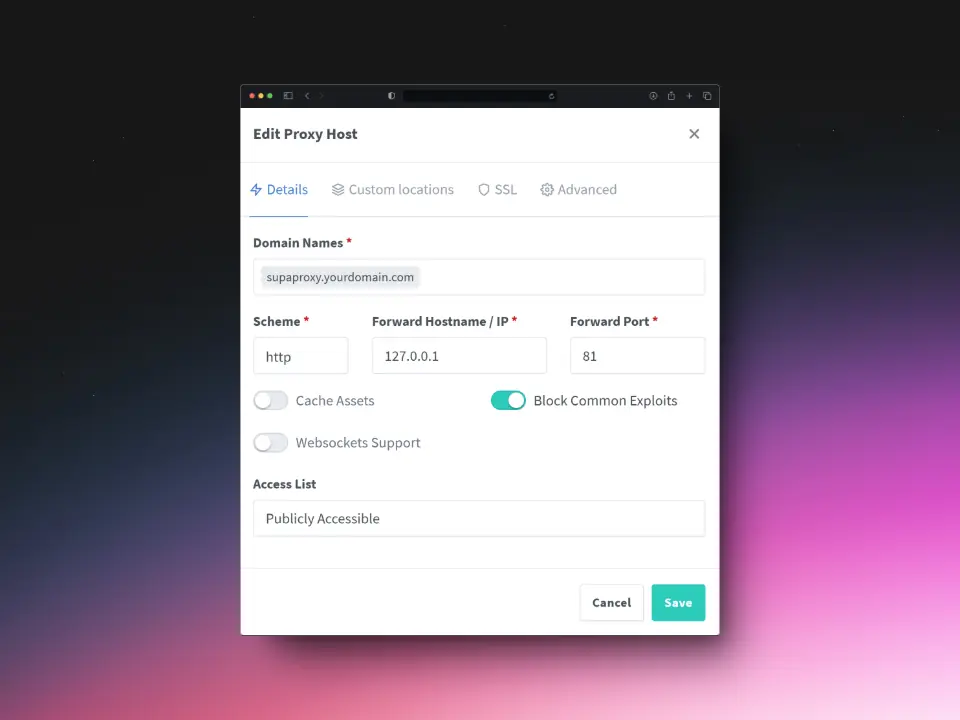
Number 1: Setting up a Proxy Host for the Nginx Proxy Manager
Use the following settings to correctly configure supaproxy.yourdomain.com.
Details
SSL
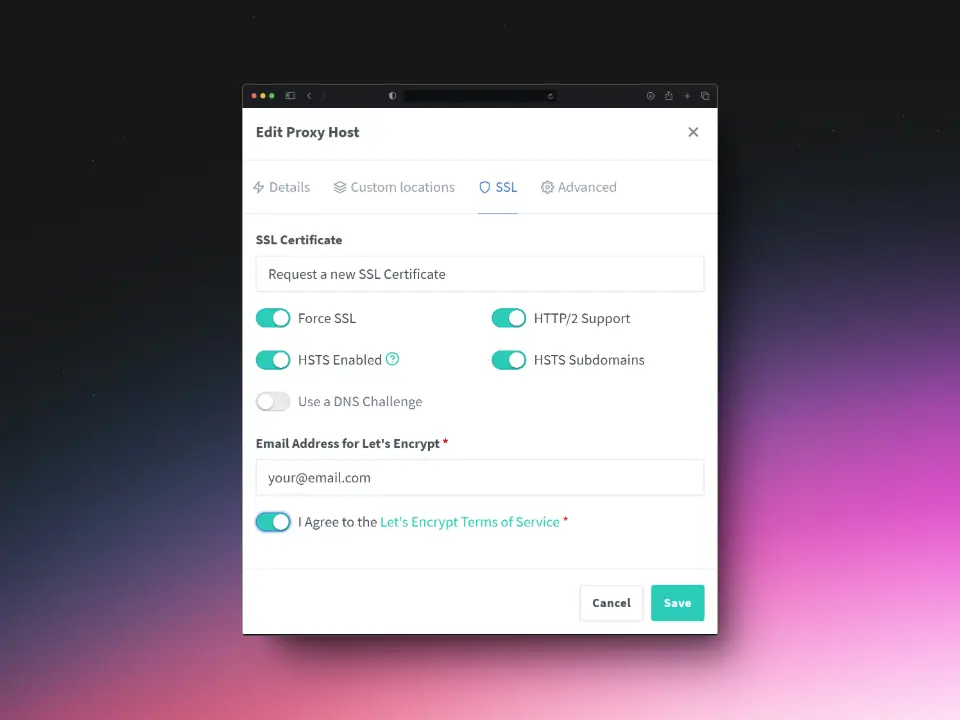
Click Save to apply the settings.
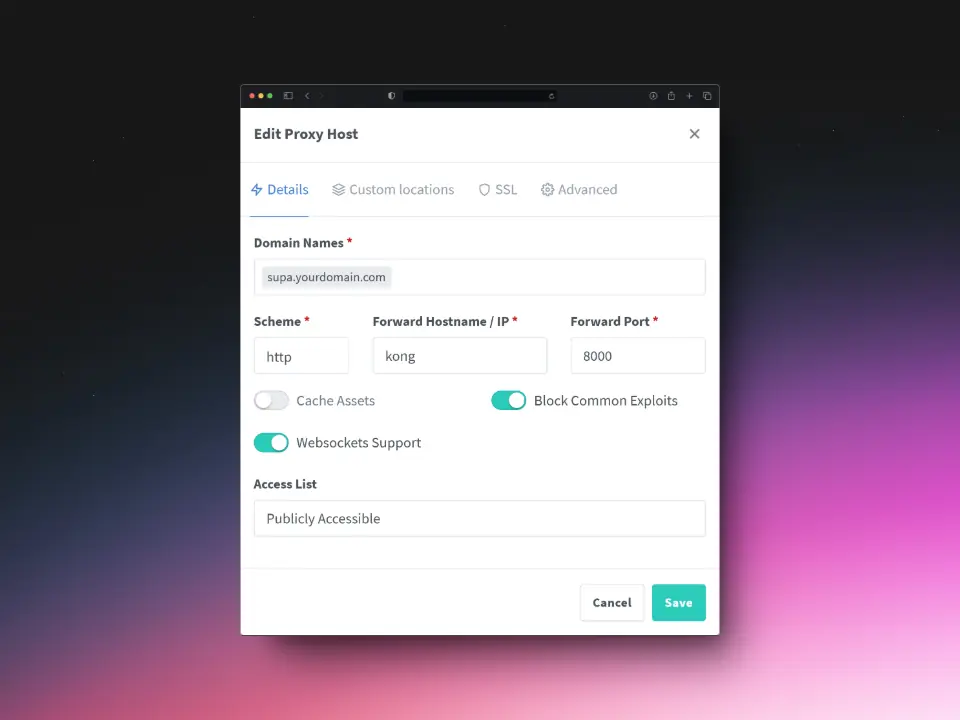
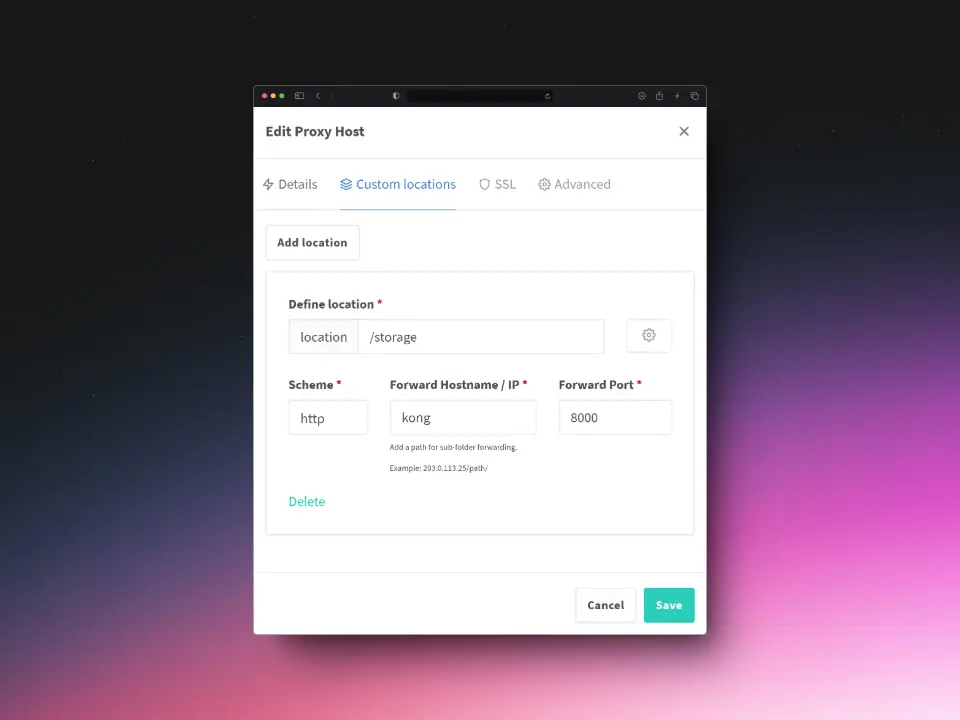
Number 2: Setting up a Proxy Host for Kong
Use the following settings to correctly configure supa.yourdomain.com.
Details
Custom Locations
SSL
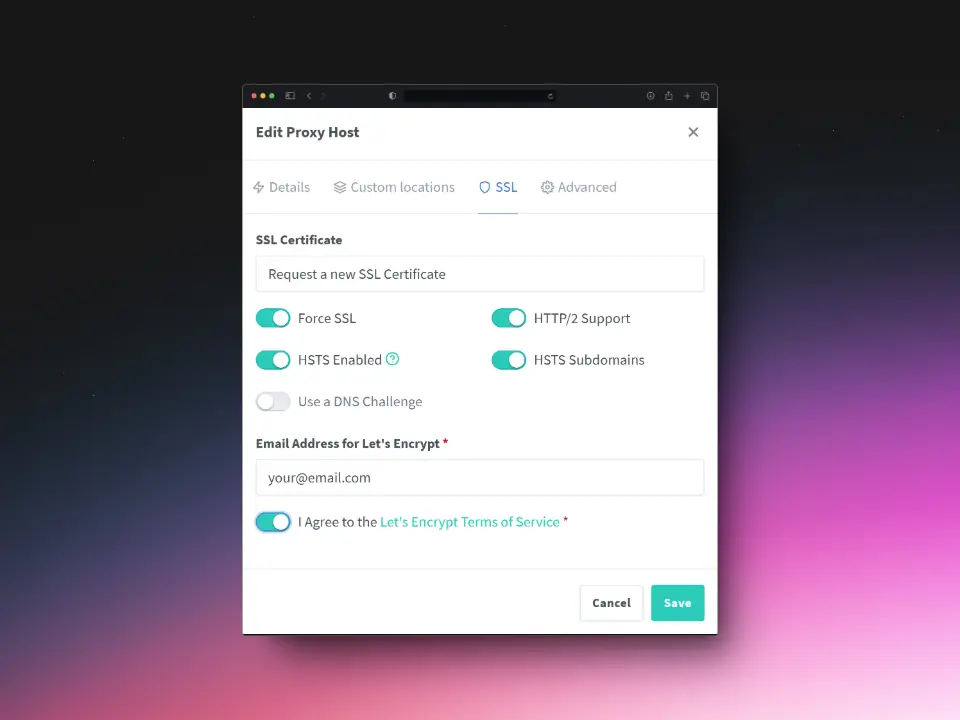
Click Save to apply the settings.
Number 3: Setting up a Proxy Host for Supabase Studio
Use the following settings to correctly configure studio.yourdomain.com.
Details
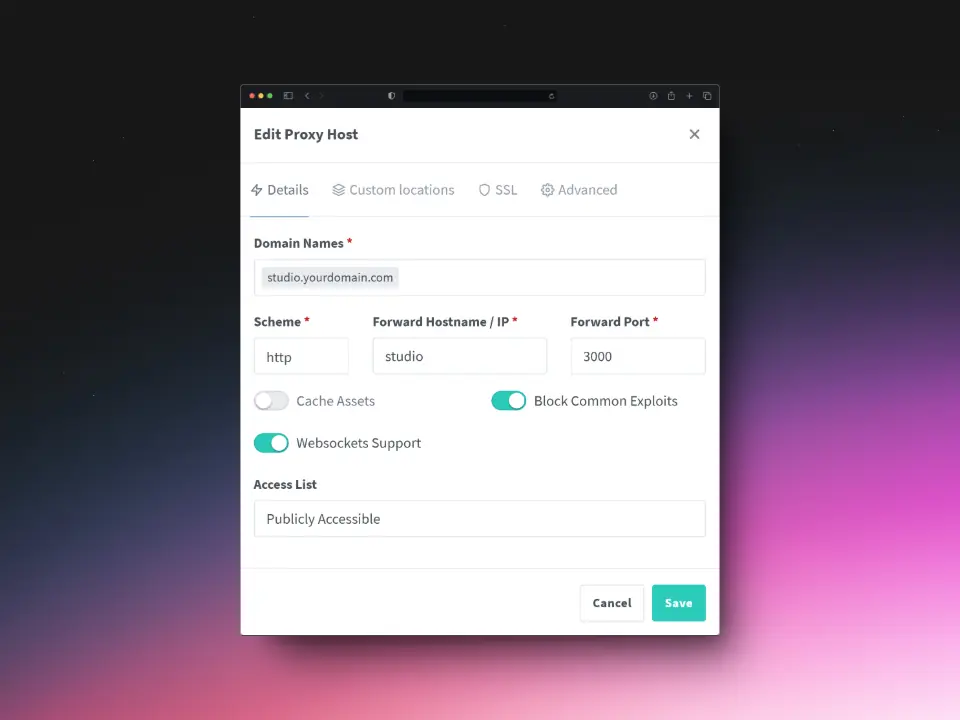
SSL
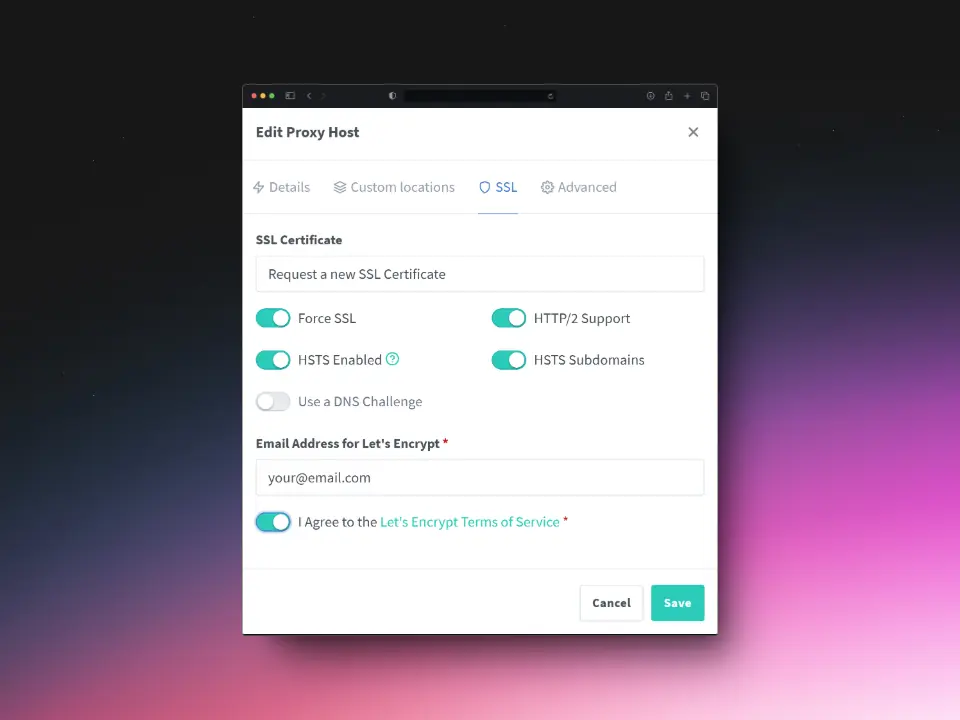
Click Save to apply the settings.
Access your new Supabase instance
TO access your new Supabase instance/installations, simply access studio.yourdomain.com through your web-browser.